Roasting
Profiles
Seed profiles by roaster kind, Artisan .alog import and export, and sharing a profile by a public link that another server imports.
A profile is a target for a roast: a bean temperature curve, with the fan and heater if it has them, events to replay (a fan step at 4:00), landmarks such as first crack, and the targets for charge and drop. The Roast page draws it on the scope from CHARGE, Profile drive can roast from it, and each roast on it is read against it.
Getting a profile
- The seed profiles come with a new install (below).
- New profile on the Profiles page opens the designer: click on the chart to add points, drag them to move them, or switch to the table to type them. Add events under Events, each fired by time or by BT.
- Save as Profile on a roast's page in History turns a good roast into one: its curve, heater and fan, events, and the whole recorded curve as a background.
- Import .alog / .json on the Profiles page takes an Artisan roast or a Roastwarden profile file (below).
- Import from a link takes another Roastwarden's shared profile (below).
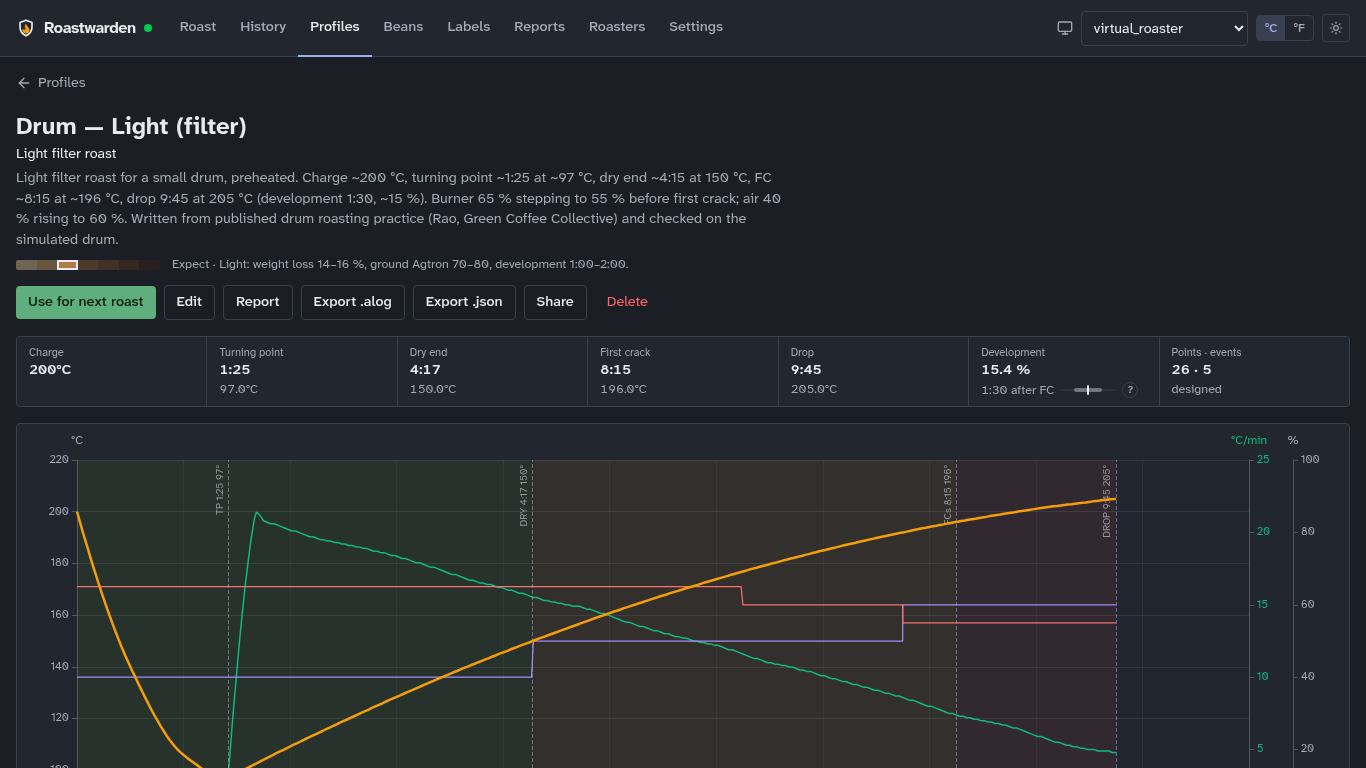
A profile's page (Profiles → the profile) shows its curve, phases, landmarks, the events it replays and its roasts against it, with Edit, Report (a PDF, reports), Export .alog, Export .json, Share and Delete.
In the editor, set its roast level and purpose so its roasts are judged against the right ranges (roast guidance), its batch size, and Auto DROP once the profile is dialed in (Profile drive). First crack is the FC landmark event; the drop time is the curve's end.
The seed profiles
Seven for an electric fluid bed charged cold, at room temperature, and two for a small gas drum charged hot:
| Profile | Level · purpose | First crack | Drop |
|---|---|---|---|
| Fluid bed — Light (filter) | light · filter | 7:45 | 9:30 @ 210 °C |
| Fluid bed — Medium (filter) | medium · filter | 8:30 | 11:00 @ 216 °C |
| Fluid bed — Light espresso | light · espresso | 9:00 | 11:30 @ 212 °C |
| Fluid bed — Light espresso, short development | light · espresso | 8:30 | 10:15 @ 210 °C |
| Fluid bed — Extra-light filter (Nordic) | extremely light · filter | 7:30 | 8:30 @ 205 °C |
| Fluid bed — Medium-light omni | medium light · omni | 8:15 | 10:15 @ 213 °C |
| Fluid bed — Cupping (SCA sample roast) | medium light · other | 8:00 | 10:00 @ 213 °C |
| Drum — Light (filter) | light · filter | 8:15 | 9:45 @ 205 °C |
| Drum — Medium omni | medium · omni | 8:45 | 11:00 @ 211 °C |
The fluid-bed curves put first crack at 200 °C, the drum ones at 196 °C. Every seed sits inside its level's development and DTR ranges except Light espresso, which plans a longer, gentler development on purpose (the profile page shows it in amber); its short-development sibling is the one to use if roasts on it come out dark. Auto DROP is off on all of them. Three older examples, "Generic … (legacy, drum-style)", come with it too: their charge and fan suit neither roaster.
They are a starting shape, not settings to copy: a fluid bed's bean probe sits in hot air and reads higher than a drum's, and a drum's burner and air percentages are its own. After a few roasts with first crack marked, move the curve to match your roaster, or save a good roast as a profile.
For a kind of roaster
A profile can say which kind of roaster it is for (the editor's For a kind of roaster: fluid bed, drum, or Any). The Profiles list puts the selected roaster's kind first and marks the others "for a drum" or "for a fluid bed"; nothing is hidden. A profile saved from a roast takes its roaster's kind; an Artisan import has none.
Artisan
Export .alog writes a file Artisan opens as a roast, or loads with Roast → Background to roast against it and replay its events. The fan and heater go out as Artisan's Air and Burner events, and dry end, first crack and drop as its landmarks. Import .alog / .json goes the other way: an Artisan roast becomes a profile with its landmarks, Air and Burner events, and its beans, batch weight and roaster. A profile with no points cannot be exported.
Sharing
Share on a profile's page, then Make a share link, gives a public address,
https://your-server/P/<code>, for someone who roasts on another Roastwarden or on Artisan.
The page shows the curve, the level and purpose, the roaster kind, the targets and the events
it replays, and offers it as profile.json (Roastwarden) and profile.alog (Artisan). It
shows the profile as it is now, so later edits show there too. It never shows who made it or
its roasts.
- Another link makes a second one, so one person's can be revoked on its own. Revoke makes the page and files a 404 from then on. Views and downloads are counted, without addresses.
- The links use Settings → Roasting → Public address when it is set. The page needs no
login, so a login proxy in front of the server must let
/P/through.
To import one, Profiles → Import from a link: paste the page's address, Read shows
what it is, Import it saves it. The server fetches it itself, only over https:// and only
from a public address, and the new profile's description says where it came from.
From the command line
roast profiles lists them; roast profile show | history | edit | save | import | export | share | shares | unshare | import-link | rm do the rest (the roast CLI). Changing
profiles needs an admin token.